In this blog post we are going to cover the logical fragmentation caused by page splits in SQL Server. You will also discover the performance hit taken when the next logical page is not the next physical page as well as the footprint generated in the transaction log when a page split occurs. We will illustrate with a test scenario the impact of a single update statement on variable length column.
Let’s create our test database and populate the table with enough rows to fill two leaf level pages and achieve 100% page density.
use master;
go
if databasepropertyex(N'TestingPageSplits', N'Version') > 0
begin
    alter database TestingPageSplits
    set single_user
    with rollback immediate;
    drop database TestingPageSplits;
end;

create database TestingPageSplits
go

use TestingPageSplits;
go

set nocount on;

create table dbo.PageSplit (
                               col1 int identity(1, 1) primary key
                              ,col2 varchar(1000)
                           );

--Lets populate this table so that we fill 2 leaf level pages
declare @i int = 0;
while @i <= 15
begin

    insert into dbo.PageSplit (
                              col2
                              )
    select cast('filling 2 pages' as char(995));
    set @i += 1;
end;
We can now inspect the structure of the index. We will concentrate on the leaf level pages(IndexLevel=0)
dbcc ind(TestingPageSplits, 'dbo.PageSplit', 0);
The following result shows two leaf level pages. In this particular test pages 344 and 346 were created. Note the link between pages by looking at NextPagePID and PrevPagePID.

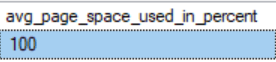
The next query checks the page density and the content of pages 344 and 346.
-- page density
SELECT f.avg_page_space_used_in_percent
from sys.dm_db_index_physical_stats(db_id(N'TestingPageSplits'),object_id(N'PageSplit'), NULL, NULL , 'detailed') f
where f.index_level =0

--page data
DBCC TRACEON(3604)
dbcc page(TestingPageSplits,1,344,3) with tableresults
dbcc page(TestingPageSplits,1,346,3) with tableresults
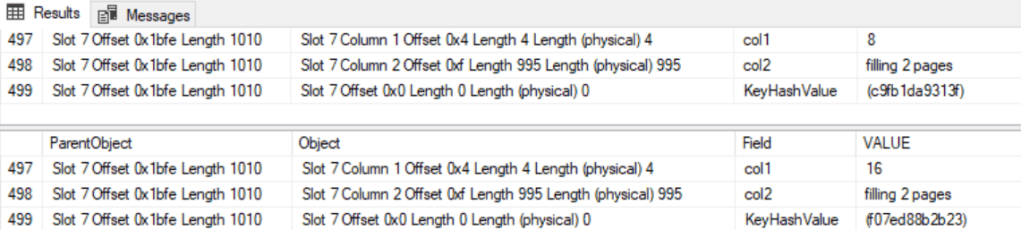
Notice how each page has exactly 8 rows each. Page 344 from 1-8 and page 346 from 9-16 rows respectively.
Now let’s update the first row on the first page without changing the record length and check the index structure, page density and transaction log footprint.
--Update without page split so that we still keep 2 leaf level pages
begin tran
update ps
set    ps.col2 = cast('still fits on same page' as char(995))
from   dbo.PageSplit ps
where  ps.col1 = 1;

select t.database_transaction_log_record_count
      ,t.database_transaction_log_bytes_used
from   sys.dm_tran_database_transactions t
where  t.database_id = db_id(N'TestingPageSplits');
commit tran

dbcc ind(TestingPageSplits, 'dbo.PageSplit', 0);

SELECT f.avg_page_space_used_in_percent
from sys.dm_db_index_physical_stats(db_id(N'TestingPageSplits'),object_id(N'PageSplit'), NULL, NULL , 'detailed') f
where f.index_level =0
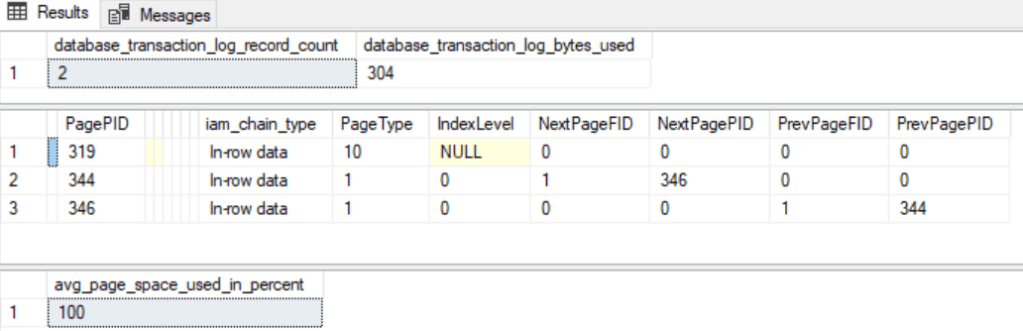
As you can see not much has changed in terms of number of pages or page density but I wanted you to notice the value of the column database_transaction_log_bytes_used because we are coming back to it later on.
Page split in action
So now we can move on to the nitty-gritty part of this blog. It is time to cause a page split and see how that affects the index structure, page density and the footprint on the transaction log.
--Update causing page split to add a third leaf level page
begin tran
update ps
set ps.col2 = cast('causing a page split' as char(996)) --add one extra blank space
from dbo.PageSplit ps
where ps.col1 = 1;
select t.database_transaction_log_record_count
,t.database_transaction_log_bytes_used
from sys.dm_tran_database_transactions t
where t.database_id = db_id(N'TestingPageSplits');
commit tran
We can now see the effect of adding a single extra character to a variable length column.
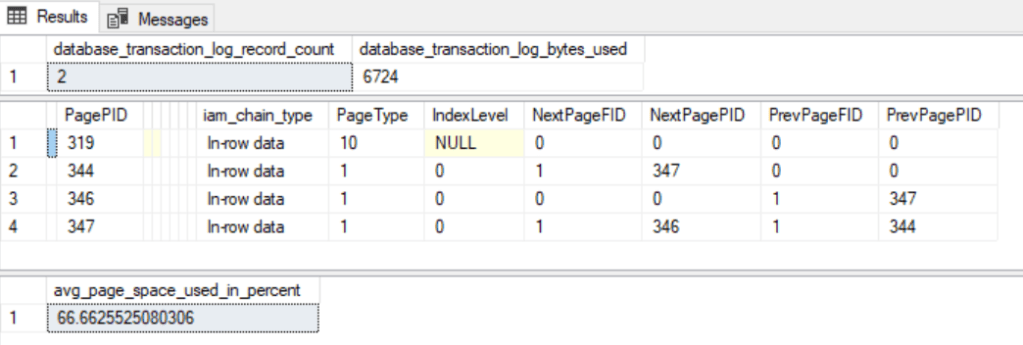
If you run the following code you will see how the data was split between page 344 and page 347. Page 344 holds the cluster index keys from 1-3 and page 347 from 4-8 values.
DBCC TRACEON(3604)
dbcc page(TestingPageSplits,1,344,3) with tableresults
dbcc page(TestingPageSplits,1,347,3) with tableresults
This is basically a similar DML operation with the only difference that we added an extra character to a page that was 100% used. This causes a page split. A new page has to be allocated and data has to be moved from the original page to the new page. In most cases half the data remains in the old page and the other half goes to the new page. In addition the circular reference (next and previous page) that allows index navigation on the leaf level needs to be updated on all the pages affected.
Before page split
Page 344 => Page 346
Page 344 <= Page 346
After page split
Page 344 => Page 347 => Page 346.
Page 344 <= Page 347 <= Page 346.
As you can see the logical order does not match the physical order of the pages. This in terms affects the way the storage engine reads pages into the buffer pool since it can not make optimal use of readaheads.
All these operations have to be logged on the transaction log. This explains the increase on the database_transaction_log_bytes_used. We went from 304 bytes used on the TLog to 6724. That is nearly a 20x increase. Quite significant if you ask me.
Conclusion :
The idea behind a page split is to generate free space for an operation to occur but in the process a lot of waste slots in the page is also generated. Every page in the buffer pool and disk will take 8KB even if it is only 50% space used. So, the more pages you have with lower the optimal page density the more space you will require on disk. The storage engine will have to perform more physical reads for the same amount of data because that data is now split across multiple pages. SQL Server is having to use more memory in the buffer pool. If you have multiple low density pages and you can’t fit your workload in memory that means you are driving more physical page reads. The more physical reads the more threats you have waiting for pages to be read into memory. This will manifest itself as a slow down in performance.
There are ways to mitigate the occurrence of page splits. One of them being rebuilding the index with a lower fill factor. However, there is a tradeoff between lowering the fill factor vs index growth.
 Jose Maurette